A few days ago, I was brought in for a short but critical consulting engagement as an external infrastructure consultant.
The company was facing a difficult situation. Their production system was still live and serving users, but the underlying infrastructure had become expensive, disorganized, and increasingly risky to maintain. At the same time, the business was preparing for a legal and operational transition that introduced strict time constraints. The existing server would soon become unavailable, which made the migration unavoidable.
This was not a typical DevOps task. It required a combination of infrastructure auditing, security assessment, migration planning, cost optimization, and risk management - all while keeping the production environment stable.
The initial objective sounded straightforward:
“We need to move our backend to a cheaper server, clean up the infrastructure, address the security and migration risks, make sure nothing breaks, and rebrand the deployment along the way.”
As is often the case with legacy infrastructure, the reality was more complex. What looked like a routine server migration quickly became a deeper assessment of the company’s operational foundation, uncovering technical debt, security gaps, undocumented dependencies, and migration risks that had accumulated over time.
No company names, no credentials, no private infrastructure details here - just the story, the technical lessons, and the thinking behind the work.
The Setup
The company was running a real consumer backend: a Django monolith deployed with Docker Compose, fronted by Nginx, backed by PostgreSQL, with Celery handling background jobs.
It was not a toy system.
There were millions of registered users, thousands of business accounts, large database tables, uploaded media, protected documents, scheduled jobs, external integrations, API consumers, and mobile clients depending on it.
The whole thing was running on a single large cloud instance:
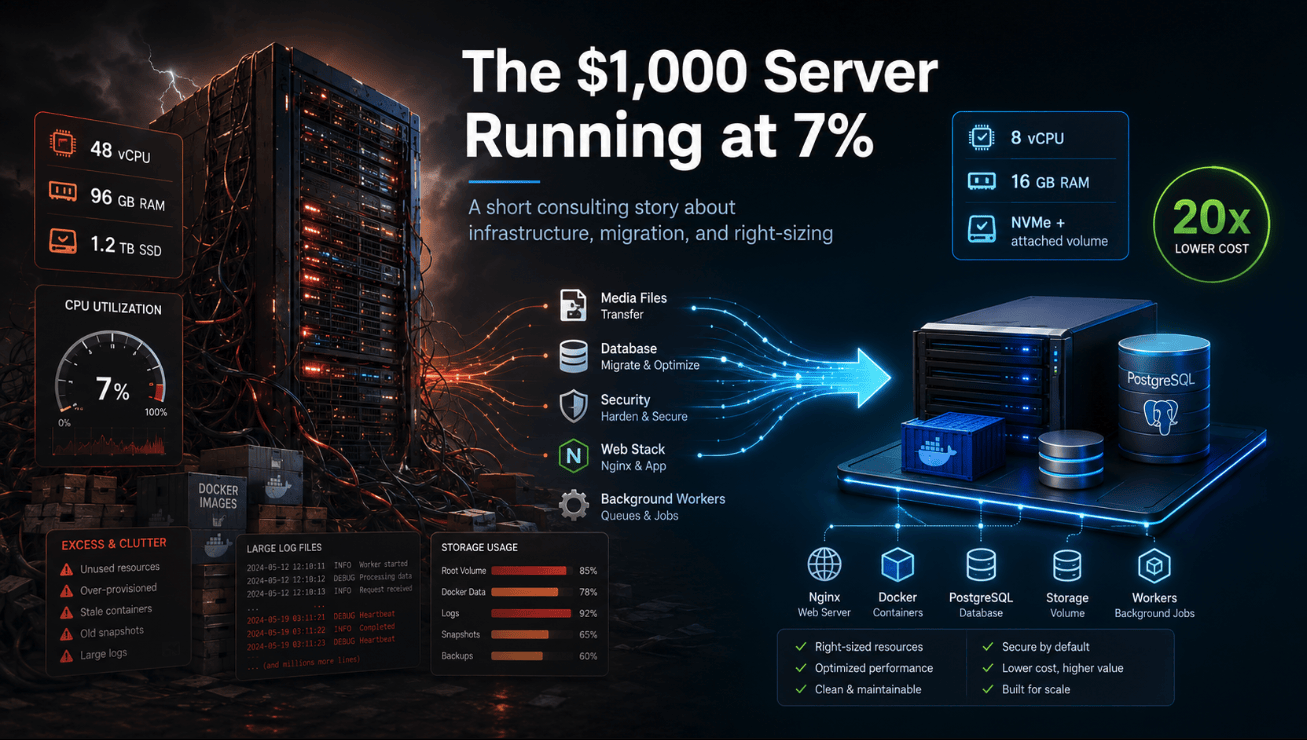
48 vCPUs, around 96 GB of RAM, and more than 1 TB of SSD storage.
A server like that, with the provider they were using, costs roughly $1,000 per month.
My first task was not to migrate anything.
My first task was to look.
Not guess. Not assume. Not trust the server size. Actually measure what the machine was doing.
What the Server Was Actually Doing
The numbers were immediately interesting.
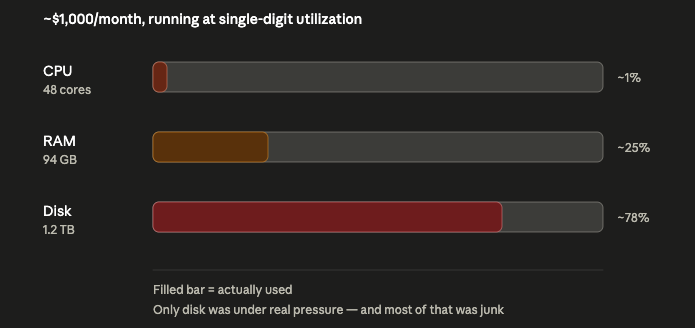
Resource | Provisioned | Actually Used |
|---|
CPU | 48 cores | Load average around 3.2 |
RAM | Around 96 GB | Around 38 GB used, much of it reclaimable cache |
Disk | Around 1.2 TB | Around 930 GB used |
At first glance, this looked like a heavy system.
But the real picture was different.
The CPU was mostly idle. The machine had 48 cores, but the actual workload was using only a small fraction of that capacity.
Memory looked more active, but most of what appeared to be “used” was operating system page cache, especially around PostgreSQL. That is normal: Linux uses free memory to cache disk reads and gives it back when applications need it. It does not mean the application truly requires 96 GB of RAM.
The only real constraint was disk.
So the company was not paying for a server because the application needed 48 cores.
They were paying for a server because, over time, the machine had become a storage dump.
The Disk Was Lying Too
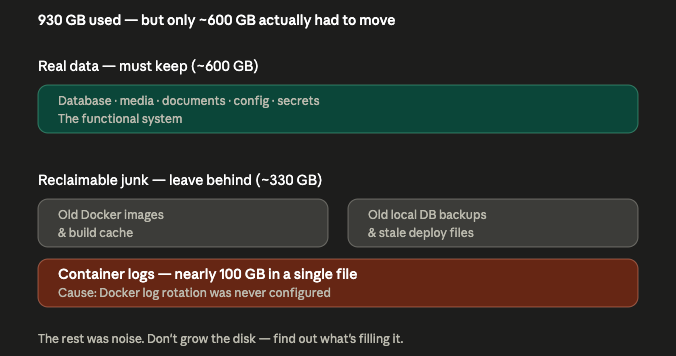
Around 930 GB of disk usage sounds like a system that needs a massive disk.
But after breaking it down, the truth was much more useful.
There was real data that absolutely needed to be preserved:
The PostgreSQL database
User-uploaded media
Protected documents
Static and media paths required by the application
Environment files
Secrets and keys
Nginx configuration
Certificates
Docker Compose configuration
Background worker configuration
That was the functional system.
But there was also a large amount of junk:
One container log alone had grown to almost 100 GB.
That happened for one simple reason: Docker log rotation had never been configured.
No complicated failure. No exotic bug. Just a missing logging limit.
A single application writing to stdout, never rotated, slowly consumed almost a hundred gigabytes of expensive SSD.
That is the kind of infrastructure problem that quietly builds up for months or years and only becomes visible when someone finally checks.
In the end, the data that actually needed to move was closer to 600 GB, not 930 GB.
The rest was noise.
This Was Not Incompetence
One thing I want to make clear: this was not the result of an incompetent team.
This is what happens to infrastructure over time.
Early on, someone provisions a large server because the company is growing and nobody wants capacity to become a bottleneck. That is a reasonable decision.
Then traffic changes. Growth assumptions change. The architecture evolves. Deployments pile up images. Logs grow. Backups get stored locally because it is convenient. Nobody has a dedicated reason to go back and question the original machine size.
Each small decision makes sense in the moment.
But compounded over time, you end up with a $1,000-per-month server running at single-digit utilization.
Most infrastructure waste is not one bad decision.
It is the absence of a later decision.
Nobody comes back to ask: Do we still need this?
Right-Sizing the Replacement
Once the real workload was clear, the replacement server did not need to be huge.
The honest compute floor was around:
But production should not be sized to the absolute minimum.
There were still background jobs, PDF generation, database activity, traffic spikes, and operational safety margins to consider. The old server also showed signs that memory pressure could appear during certain workloads.
So I recommended a safer small configuration:
The storage split was important.
PostgreSQL should stay on fast local disk. Media and documents can live on a separate attached volume because they are bulky, grow over time, and can be expanded later without rebuilding the server.
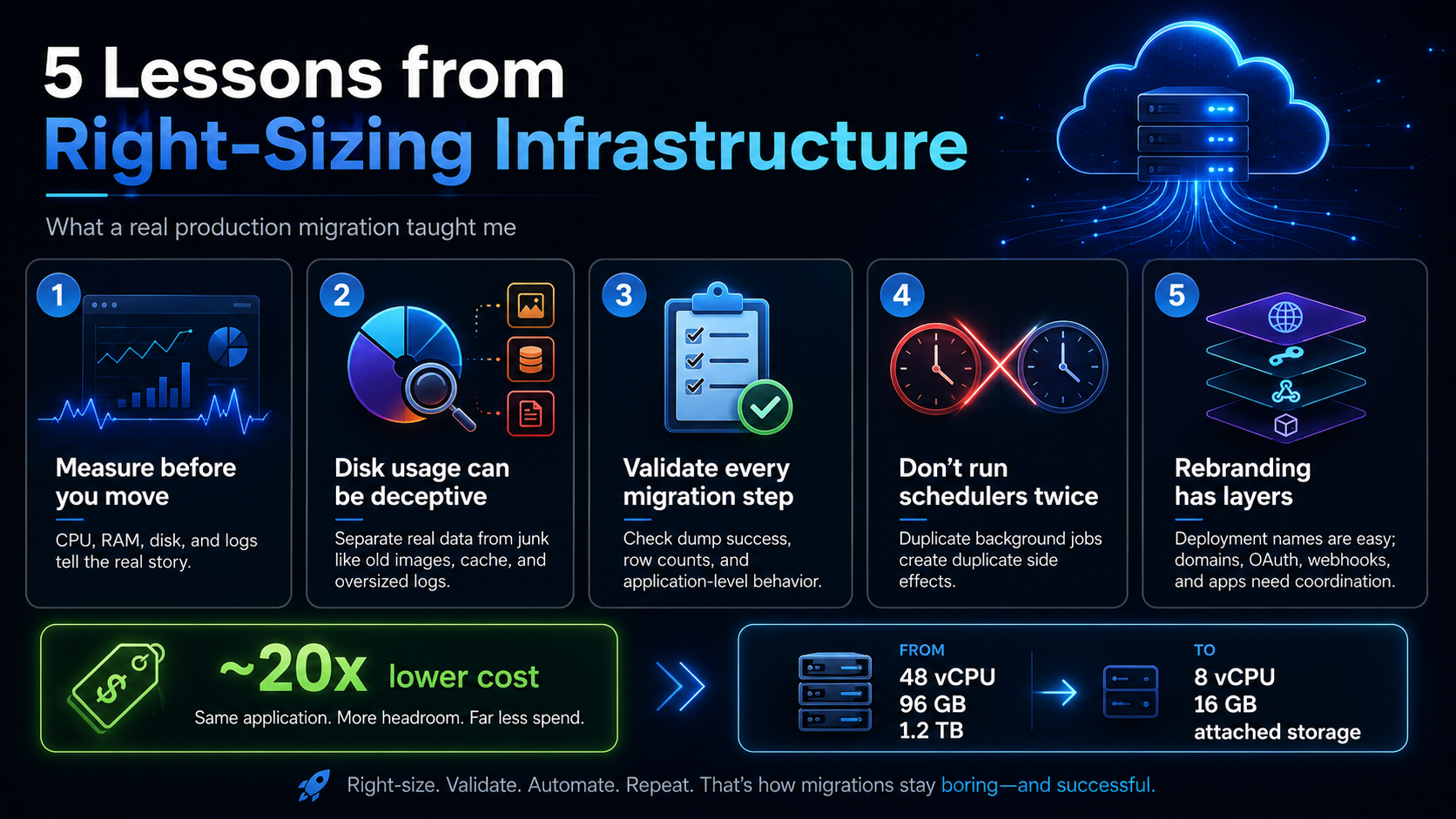
The result was a setup costing roughly €50 per month instead of around $1,000 per month.
That is not a small optimization.
That is a 20× cost reduction.
For a company trying to control costs, that is real money saved every month.
Preparing the New Server
Before moving the application, I validated the new server.
I checked:
One important issue appeared early.
Docker had been configured in a way that prevented containers from reaching the internet correctly.
That would have broken external integrations, API calls, background jobs, package installation, and anything else requiring outbound network access.
So before migrating the application, I fixed Docker networking and configured proper Docker log rotation.
That one change solved two future problems:
Containers could correctly reach external services.
Logs could no longer grow endlessly until the disk filled again.
Small configuration details matter.
Renaming Without Breaking Production
There was also a legal and naming constraint.
The company needed the new infrastructure to use a different public identity. The old name should not be exposed unnecessarily in the new deployment.
But this had to be handled carefully because not every name in a software system is equal.
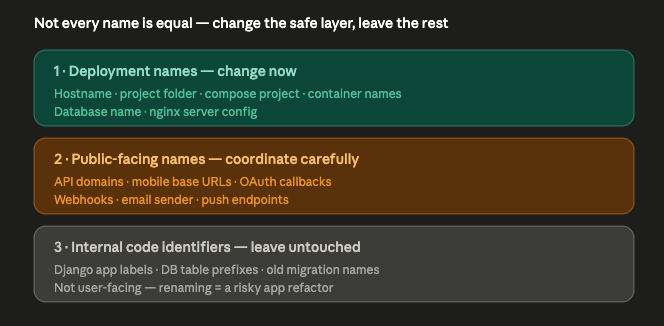
There are three different layers:
1. Deployment-level names
These include:
These can usually be changed safely during a migration.
2. Public-facing names
These include:
These require coordination with external systems, app releases, DNS, and third-party dashboards.
3. Internal code and database identifiers
These include:
Changing these during an infrastructure migration would be risky and unnecessary.
So I made a deliberate decision: rename the deployment layer now, but leave the internal application identifiers untouched.
That was the safe tradeoff.
The visible server identity changed. The database name changed. The Docker project name changed. The public domains could be added carefully.
But internal Django app labels and database table names stayed as they were, because they were not visible to users and renaming them would have turned a server migration into a risky application refactor.
That kind of separation matters.
A migration is already dangerous enough. Do not add a database refactor unless you absolutely need to.
Moving the Application
The application code was copied to the new server, excluding unnecessary logs, stale files, and large media that belonged on the attached volume.
Then I updated the deployment configuration:
New project folder
New database name
New Docker Compose project name
Right-sized web worker count
Right-sized Celery concurrency
Local-only PostgreSQL and PgBouncer bindings
Proper Docker log rotation
Correct media and static paths
Updated Nginx configuration
HTTPS certificates for the new domains
Host and CSRF configuration for the new API domains
One critical issue came up during this step.
The application did not use the database environment variable I initially expected. It was reading the database name from a secrets file.
If that had not been caught, the containers could have started but failed to connect to the restored database.
This is exactly why migrations must be verified against how the application really works, not how you assume it works.
Configuration has a way of hiding in unexpected places.
Moving the Media
The media directory was large: hundreds of thousands of files and hundreds of gigabytes of uploaded content.
Copying that during downtime would have been a bad idea.
So I used a pre-seed strategy.
First, copy the bulk of the media while the old system stays live.
Then, at final cutover, run a quick delta sync to copy only what changed.
This keeps the long, slow copy out of the downtime window.
That pattern is simple, but very effective:
Pre-seed the heavy data.
Keep production running.
Final delta sync at cutover.
Switch traffic.
The large copy happens with zero user impact.
Moving the Database
The database migration was the most sensitive part.
The first dump attempt exposed a problem that could have become dangerous.
The dump stream was interrupted partway through. A dump file existed. It looked plausible. A restore could even create tables.
But the data was incomplete.
The first script did not strictly check the dump exit code before continuing. That meant a partial dump could be restored into the destination database.
Luckily, I had captured reference row counts from the source database before restoring. When the restored database had the wrong numbers, the issue was obvious.
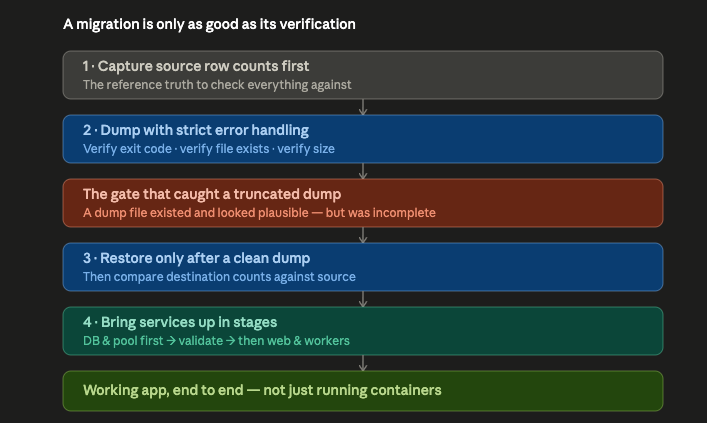
So I rebuilt the process properly:
Capture source row counts first
Run the dump with strict error handling
Verify the dump exit code
Verify the dump file exists
Verify the dump size
Restore only after a successful dump
Compare destination row counts against source counts
Validate table count
Validate migrations
Validate application-level reads through the ORM
This is the difference between “a file exists” and “the database migrated correctly.”
A backup or dump is only useful if it is verified.
pg_dump exiting successfully matters. Row counts matter. Application reads matter.
Without validation, a migration can look successful and still be a time bomb.
Bringing the Stack Online
I brought the system up in stages.
First:
PostgreSQL
PgBouncer
Redis
Memcached
Then:
Only after that:
The order matters.
If you start the web application against an empty or half-restored database, you do not have a working migration. You have containers returning errors.
Infrastructure should come up in a controlled sequence.
The Scheduler Problem
One of the easiest mistakes in migrations is running background schedulers in two places.
This system used scheduled Celery tasks.
The new server could start the scheduler successfully, but the old server was still live. If both schedulers ran at the same time, the company could send duplicate emails, duplicate notifications, duplicate API calls, or duplicate business operations.
So I validated that the scheduler worked, then intentionally stopped it on the new server.
It should only be activated once the old scheduler is stopped.
That distinction is important:
Validation is not activation.
Just because something can run does not mean it should run yet.
Validating the New Server
Once the application was running, I tested the new environment end-to-end.
The validation included:
HTTPS and certificate checks
Admin login
API authentication
Authenticated API calls
Database reads through the application
Static file serving
Media file serving
Protected document serving
Celery worker health
Nginx logs
Application error logs
Database row counts
Migration consistency
Host-based routing
External-facing API paths
The new system was able to serve production data from the new server, through the new domain, using the restored database and copied media.
That was the real milestone.
Not “Docker containers are running.”
The milestone was: the application works end-to-end on the new infrastructure.
What Still Required Care
Even after the new server worked, the full transition required careful handling.
Some dependencies could not be blindly renamed:
Existing mobile apps might still call the old API domain.
Webhooks might still point to old callback URLs.
OAuth providers might still require old redirect URIs.
Email sending might still depend on the old sender domain.
Push notification systems might still use old branded endpoints.
Third-party integrations might have hardcoded callback URLs.
This is where technical migration and legal/brand migration overlap.
Moving the server is one phase.
Fully retiring an old domain is another.
If a mobile app has an old API base URL compiled into a released version, DNS alone does not fix the problem unless that old hostname continues to resolve to a working backend. If an OAuth provider has an old callback URL whitelisted, changing the domain without updating the provider breaks login.
So the safe approach was:
Make the new server work under the new domain.
Keep transition compatibility where required.
Update mobile apps, webhooks, OAuth, email, and external services carefully.
Retire the old domain only after all dependencies are migrated.
That is the boring, correct way to do it.
Security and Operational Cleanup
A migration is not finished when the app starts.
Before handing over the system, I focused on the cleanup items that would prevent the next fire:
Docker log rotation configured on every container
Database and connection pooler bound locally, not exposed publicly
Worker counts reduced to match the real workload
Media moved to the correct attached volume
Secrets and keys copied only where needed
File permissions reviewed
Nginx configured for the required hostnames
HTTPS certificates configured
Scheduled jobs prevented from running in duplicate
Temporary migration privileges identified for removal
Password rotation recommended
Off-server backups recommended before the new server became the only production system
That last point matters a lot.
A backup stored on the same server as the database is not enough.
If the server dies, the backup dies with it.
Backups need to live somewhere else.
The Result
In a short consulting window, the company moved from an oversized, expensive production server to a much smaller and cleaner infrastructure setup.
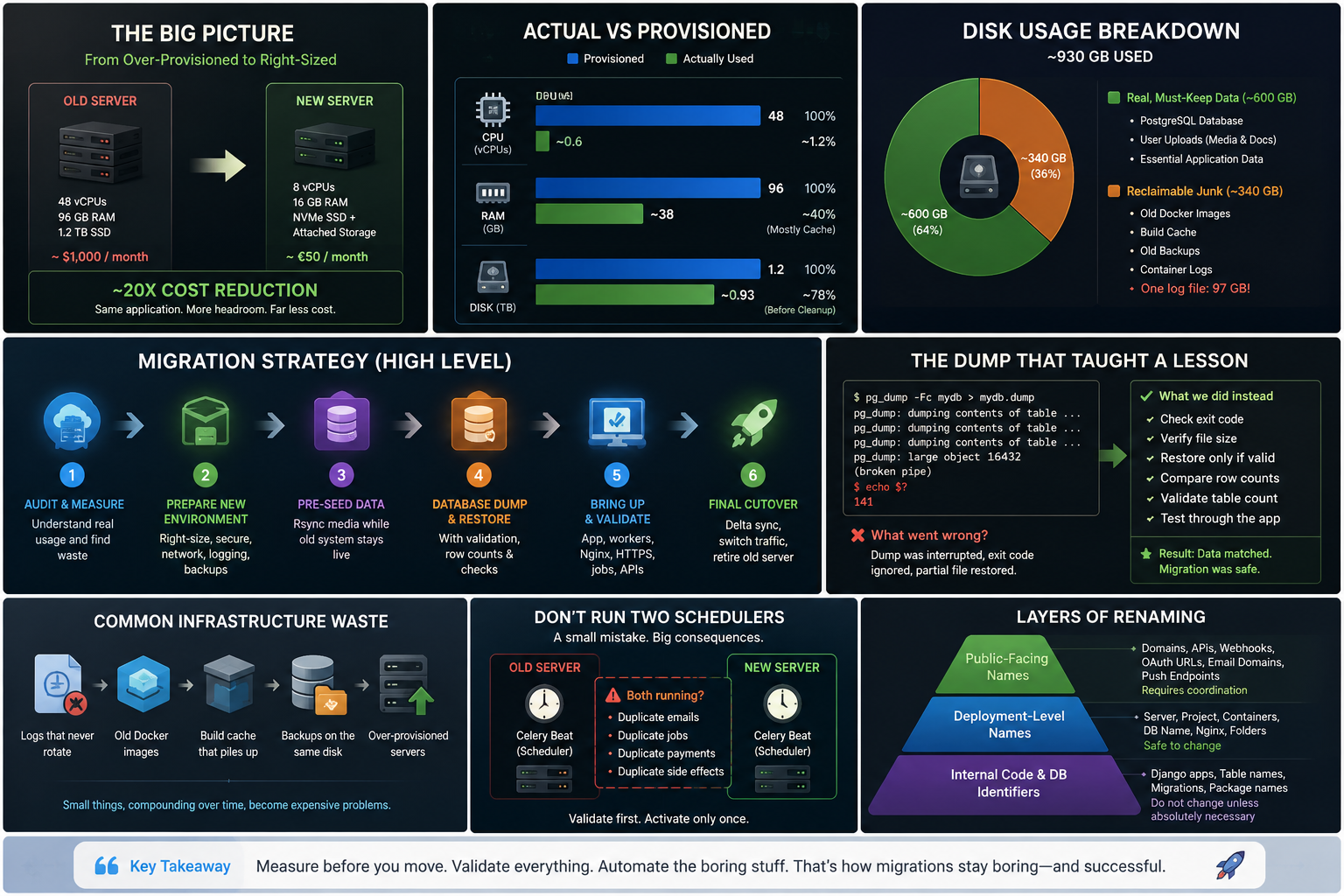
The result was:
Around 20× lower monthly infrastructure cost
A smaller and more understandable deployment
Proper Docker log rotation
Right-sized application workers
Database restored and validated
Media copied to growable storage
HTTPS and Nginx configured for the new domains
Deployment-level rebrand completed safely
Duplicate scheduled-task risk avoided
Clear remaining checklist for final cutover and domain retirement
Most importantly, the new system was validated at the application level, not just the container level.
It served real data. It authenticated users. It reached the database. It served media. It had working workers. It could be tested before the old server was retired.
That is what “ready” should mean.
What I Took Away
There are a few lessons from this project that I keep thinking about.
1. Most infrastructure waste is invisible until someone measures it
Nobody intentionally chose to waste money.
The server was oversized because it had probably been provisioned at a time when caution felt better than optimization. Then nobody came back to challenge it.
This is common.
Infrastructure waste usually does not announce itself. It just appears as a monthly bill.
2. The live system tells the truth
The original server spec said one thing.
Actual usage said another.
The CPU was mostly idle. RAM was mostly cache. Disk was full of a mix of real data and junk.
You cannot right-size infrastructure from memory. You right-size it from measurements.
3. Disk usage needs investigation, not assumptions
930 GB used did not mean 930 GB of important production data.
Old logs, stale images, build cache, and local backups were taking a huge amount of space.
Before increasing disk size, ask what is actually using the disk.
4. A migration is only as good as its validation
A dump file existing does not mean the dump is complete.
A container running does not mean the app works.
A database restored does not mean the data matches.
Every migration needs checks:
Exit codes
Row counts
Logs
API calls
Application-level reads
Static and media tests
Background worker health
5. Do not run schedulers twice
This is one of the simplest ways to create real-world damage during a migration.
Two servers running the same scheduled jobs can create duplicate side effects. Always decide exactly where scheduled tasks are active.
6. Rebranding infrastructure has layers
Changing a folder name is easy.
Changing a public API domain used by mobile apps, OAuth providers, webhooks, emails, and push systems is not.
Legal/brand migration must be planned across the whole ecosystem.
7. The boring safeguards are the whole job
Checking an exit code is boring.
Writing down row counts is boring.
Configuring log rotation is boring.
Stopping duplicate schedulers is boring.
Moving backups off-server is boring.
But those boring steps are the difference between a smooth migration and a production incident.
Final Thought
This was only a few days of consulting work, but it touched almost every part of a real production system: servers, Docker, PostgreSQL, Nginx, Celery, media storage, certificates, DNS, secrets, security, external integrations, and legal naming constraints.
The technical work was important.
But the real value was judgment.
Knowing what to move.
Knowing what to ignore.
Knowing what to rename.
Knowing what not to rename.
Knowing when a running container is not the same as a working application.
And knowing that a successful migration is not just about getting onto a new server — it is about leaving the system cheaper, safer, cleaner, and easier to operate than it was before.
A few days of work. A roughly 20× infrastructure cost reduction. A cleaner deployment. A safer migration path.
That is a good week.
If your production infrastructure has been quietly running for years without anyone looking closely at it, spend an afternoon with the basics: CPU, memory, disk, logs, backups, containers, and actual workload.
You might be surprised by what you are paying for.