Introduction: Teaching AI to Use Your Tools
AI assistants like Claude are brilliant at reasoning and writing, but on their own they're trapped in a box. They can't read your files, check your calendar, query your database, or update your website—unless you give them a way to reach out. For years, every developer who wanted to connect an AI model to an external tool had to build a custom, one-off integration. It worked, but it didn't scale.
The idea in one line: MCP (Model Context Protocol) is a universal standard that lets any AI assistant talk to any tool or data source through one common language—so you build an integration once and it works everywhere.
And here's the fun part: this very blog post was written and published through MCP. This site, maqboolthoufeeq.com, runs its own MCP server—so I can simply ask an AI to "write a post about MCP and publish it," and it does, using the same tools we'll explore below.
What Exactly Is MCP?
The Model Context Protocol is an open standard, originally introduced by Anthropic, that defines how an AI application and an external system should communicate. Think of it as a shared etiquette: as long as both sides follow the rules, they understand each other—no custom translation required.
The classic analogy is the USB-C port. Before USB-C, every device had its own charger and cable. Now, one port fits your laptop, phone, headphones, and monitor. MCP aims to be the USB-C of AI: one standard connection that lets a model plug into Google Drive, a Postgres database, GitHub, Slack, or your own homemade tool.
Why it matters: Without a standard, connecting M models to N tools means building M × N integrations. With MCP, you build M + N. That's the difference between a tangle of wires and a clean, reusable system.
The Three Building Blocks
MCP has a simple architecture with three main parts. Once you understand these, everything else clicks into place.
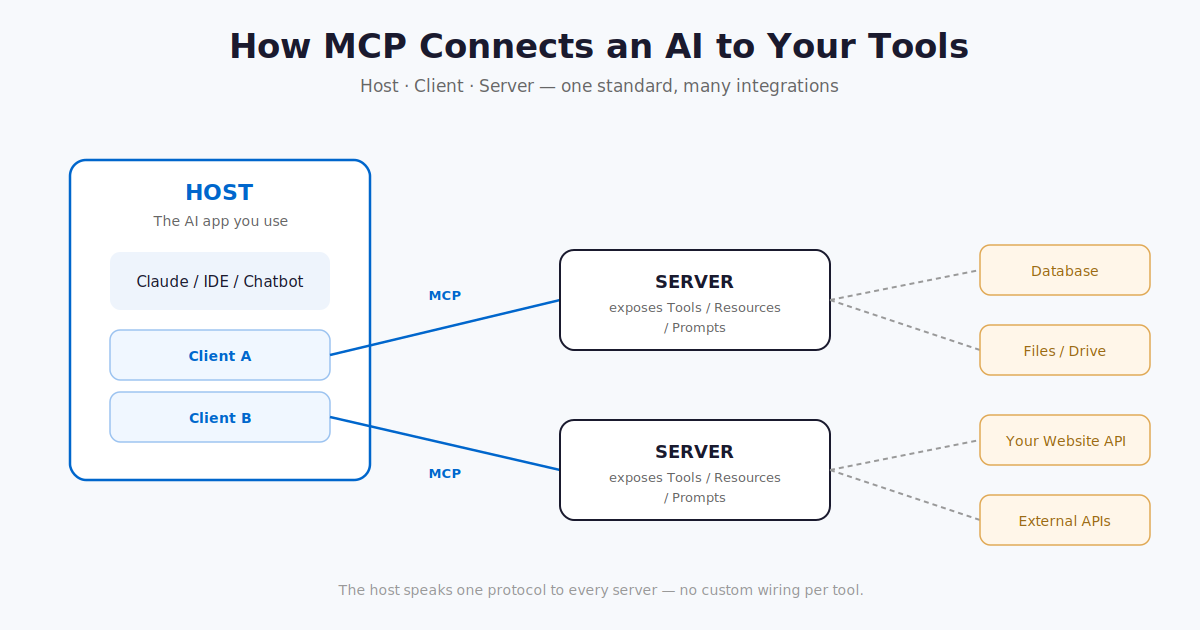
- The Host: The AI application you actually use—like the Claude desktop app, an IDE, or a chatbot you've built. It's the place where the conversation happens.
- The Client: A connector that lives inside the host and maintains a one-to-one link with a server. It handles the back-and-forth messaging on behalf of the AI.
- The Server: A small program that exposes a specific capability—reading files, querying a database, calling an API. This is the piece you most often build yourself.
In plain terms: the host is the app, the client is the phone line, and the server is the expert on the other end who actually does the work.
What a Server Can Offer
An MCP server can expose three kinds of things to the AI:
- Tools — actions the AI can take, like "create a blog post" or "feature a project."
- Resources — data the AI can read, like an existing post, a project record, or a site section.
- Prompts — reusable templates that guide the AI through a common workflow.
A Real Example: The Server Behind This Website
Instead of a toy example, let's look at a real one: the MCP server that powers maqboolthoufeeq.com. It turns the whole website into a set of tools an AI can use. With it, an assistant can manage the blog, the portfolio projects, the landing page, the look and feel—essentially everything you'd otherwise edit by hand in an admin panel.
Here are some of the real tools this server exposes:
- Blog:
create_post, update_post, publish_post — write, edit, and publish articles.
- Projects:
create_project, update_project, reorder_projects — manage the portfolio.
- Page content:
update_hero, update_about, update_navbar, update_contact — edit every section of the landing page.
- Images:
upload_image_from_url — pull an image onto the site's own CDN.
- Look & feel:
set_theme, set_design — switch color themes and UI styles.
- Tags:
create_tag, update_tag — organize content.
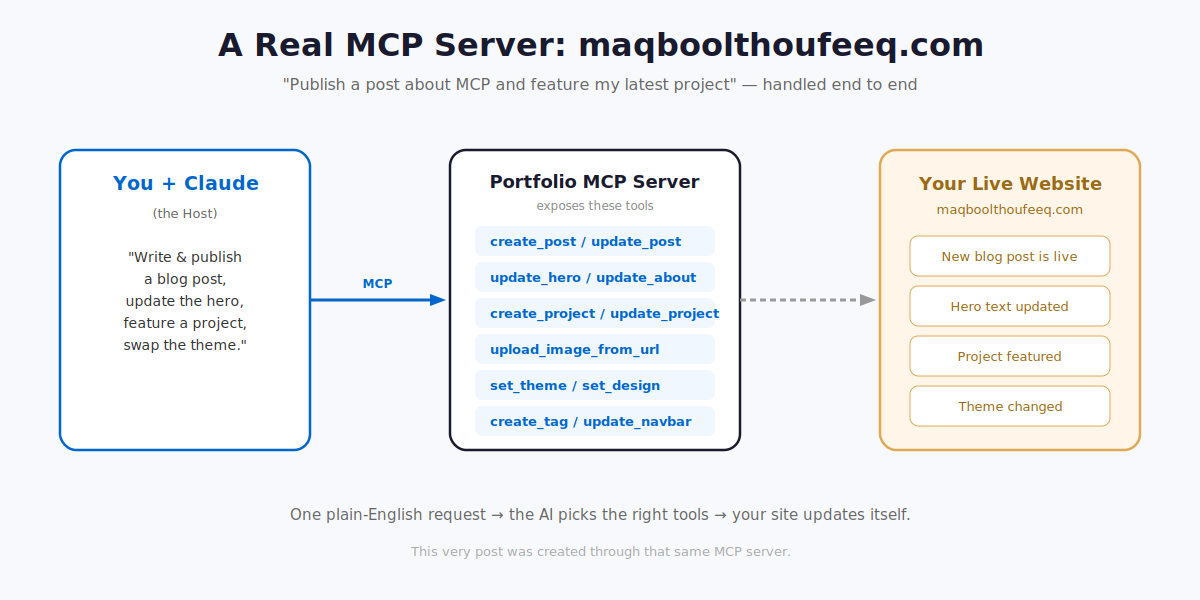
So a single plain-English instruction like "Write a post about MCP, publish it, then feature my latest project and switch the site to a darker theme" becomes a chain of tool calls the AI makes on its own: create_post → publish_post → update_project → set_theme. You describe the outcome; MCP handles the wiring.
How to Build a Server Like This
Building one is more approachable than it sounds. Official SDKs exist for Python, TypeScript, and other languages, and they handle the protocol's plumbing for you. Your job is just to wrap your existing functions—the same ones your admin panel already uses—and describe what they do.
Here's a simplified TypeScript sketch of how a "create blog post" tool on this very site might be defined:
import { McpServer } from "@modelcontextprotocol/sdk/server/mcp.js";
import { z } from "zod";

const server = new McpServer({ name: "portfolio", version: "1.0.0" });

// Expose a real action: create a blog post
server.tool(
  "create_post",
  "Create a new blog post on maqboolthoufeeq.com",
  {
    title: z.string(),
    content: z.string(),          // Tiptap/HTML body
    excerpt: z.string().optional(),
    published: z.boolean().default(false),
    tagIds: z.array(z.string()).optional(),
  },
  async ({ title, content, excerpt, published, tagIds }) => {
    // Reuse the same logic your website already has
    const post = await db.post.create({
      data: { title, content, excerpt, published, tags: tagIds },
    });
    return { content: [{ type: "text", text: `Created post: ${post.slug}` }] };
  }
);

server.start();
Notice three things. The name and description tell the AI when to reach for this tool. The schema (here using Zod) defines exactly what inputs are valid, so the AI can't send garbage. And the body just calls the same database logic the website already relies on—MCP doesn't replace your backend, it exposes it safely.
The Steps in a Nutshell
- Install the SDK (e.g.
npm install @modelcontextprotocol/sdk or pip install mcp).
- Create a server instance and give it a name.
- Wrap each existing action as a tool with a clear schema.
- Write good descriptions—the AI relies on them to pick the right tool.
- Run the server and connect it to a host.
How to Integrate and Use It
Once your server is running, you point a host at it. Servers can run in two main ways. Local servers run on your own machine and talk over standard input/output—great for personal files and scripts. Remote servers run on the web and talk over HTTP—this is how a hosted service like the maqboolthoufeeq.com server works, so it can be reached from anywhere with proper authentication.
For a local server, a host's config entry is as simple as this:
{
  "mcpServers": {
    "portfolio": {
      "command": "node",
      "args": ["portfolio-server.js"]
    }
  }
}
A remote server is added through your host's connector settings using its URL. Once the host knows about the server, the AI automatically discovers every tool it offers—and you can start giving instructions in plain language.
Tip: You don't always need to build from scratch. A growing ecosystem of pre-built MCP servers already exists for popular services—so integrating often means just adding a config entry and authenticating.
More Ways People Use MCP
Managing a website is just one use. The same pattern applies almost anywhere:
- Developer workflows: Ask the AI to read your repository, open a pull request, or check why a build failed—directly from your editor.
- Knowledge access: Let the assistant search your documents in Google Drive and summarize the relevant ones before a meeting.
- Data analysis: Connect it to a database so it can answer "what were last quarter's top-selling products?" by writing and running the query itself.
- Content operations: Exactly what this site does—draft, format, publish, and restyle, all from a sentence.
A Word on Safety
Because MCP gives an AI real power to act—including publishing to a live site—treat it with the same care you'd give any system that touches your data. Only connect servers you trust, be deliberate about which tools can write or delete (versus just read), require authentication for remote servers, and review the permissions you grant. A standard makes integration easy—but good judgment keeps it secure.
Conclusion
MCP solves a real and growing problem: how to connect increasingly capable AI models to the messy, varied world of real tools and data—without rebuilding the wiring every time. By standardizing the conversation between hosts and servers, it turns custom integrations into reusable building blocks.
If you can write a simple function, you can build an MCP server—and as this very site proves, you can hand an AI the keys to publish and manage real content. The best way to learn is to build something small: pick one action you wish your AI could perform, wrap it in a server, and connect it. You'll understand the whole protocol in an afternoon.
Published on May 25, 2026 | Tags: AI, Software